No, your Uber payment method didn't expire, it's just a scam attempting to steal your payment information. Here's how to spot such scams.
Email is a ubiquitous tool that everyone needs for basic web access and account creation. While some tools like Hide My Email attempt to reduce spam, they aren't foolproof.
Users across social media and some staff at AppleInsider have received a bogus email claiming to be Uber. While there are many red flags that suggest the email is a fake at first glance, not everyone is going to have the skills to recognize that.
Before I get into how this specific email was a clear fake, there is one simple universal rule that will always help you with such scams:
Never click on a link in an email or text message that offers to take you to a web portal or app. Instead, navigate to the app or website manually and log in to see if there are any errors or notifications there.
Emails often use images as links to obfuscate the URL, and even when examining the URL, it is easy to use similar Unicode characters to simulate a real address. Even the most discerning person can get fooled by an "l" versus an "I."
Avoid the problem and go to the website or app yourself. It's that simple.
The fake Uber email
If you look at a lot of email, you're probably an accidental expert in spotting fake ones. The slightest change in format can signal you're not dealing with the actual entity.
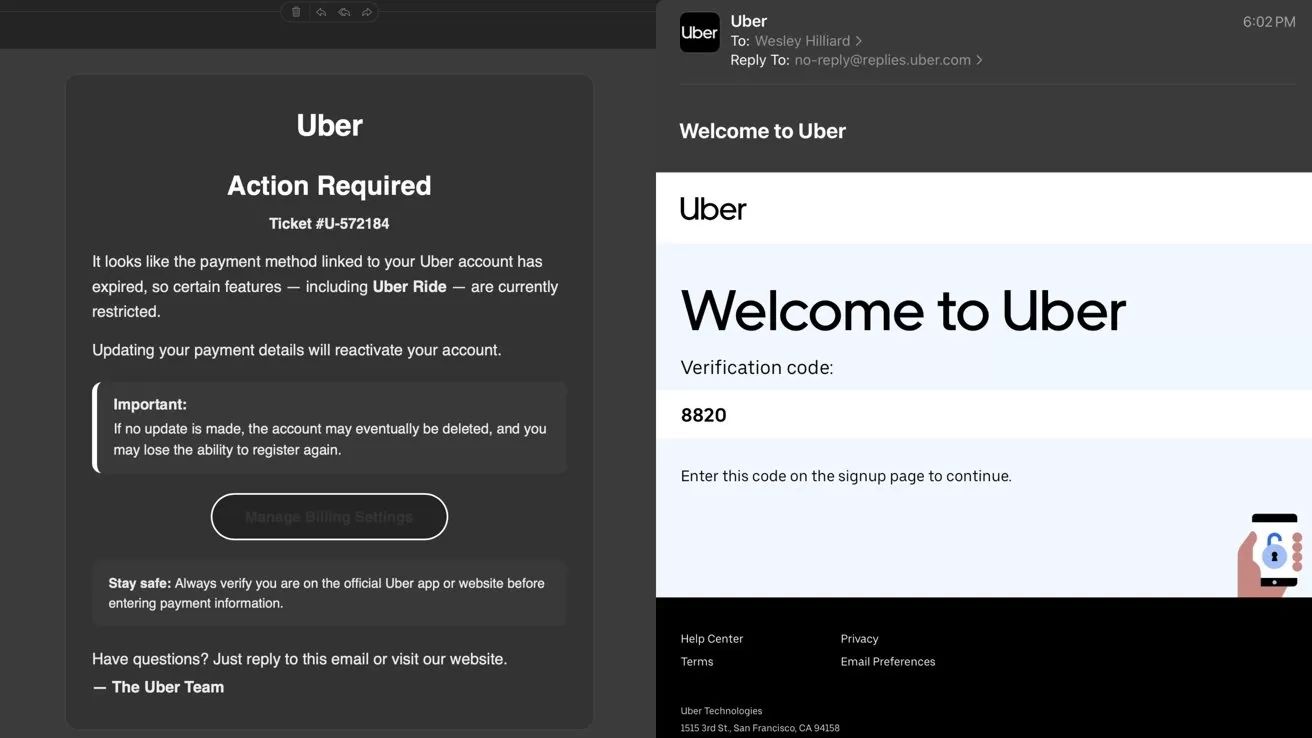
The fake scam email (left) versus a legitimate email from Uber (right)
For example, while I'm not an Uber customer and don't get notices from them, I can tell at a glance that this email is strange. It lacked any kind of branding, the font and choice of font size seemed odd, and the email sender was ridiculous.
I got Uber to send me an email by attempting to sign into an account and saw what its format actually looks like. See how it has a branded logo, a footer, a contact icon, and an address belonging to uber.com, and some standard imagery.
Some emails will be verified via Apple's email backend and get a checkmark, while others will have a contact image shared by the address. Emails can't spoof that verification check.
Now, not every legitimate email will have a verification check or a contact image. Even many of Apple's emails, like from Apple News, don't have a verified address. I do see a verified checkmark by Affirm emails, but not from my bank.
Remember, these are good indicators, but don't always guarantee legitimacy.
Another red flag is the "From" slot is named "UBER" in all caps. The subject line also lacked any clear address to the user by name or account number.
The email itself is oddly formatted. The title and subhead are an odd size and centered, then there's a ticket number, but no mention of the user's name or account number.
A prominent warning is shown in a callout, then "Manage Bill Settings" is shown in an odd gray button format. The second callout about staying safe is an attempt to make users believe this is legitimate, because the scammer is counting on you simply clicking the button.
Beyond the many red flags in the design and layout of the email, there are some very obvious and simple indicators that this is fake. I've saved these for last because they're so blatant, but it is helpful to understand the other aspects as well.
Not every scam email will be so easy to spot
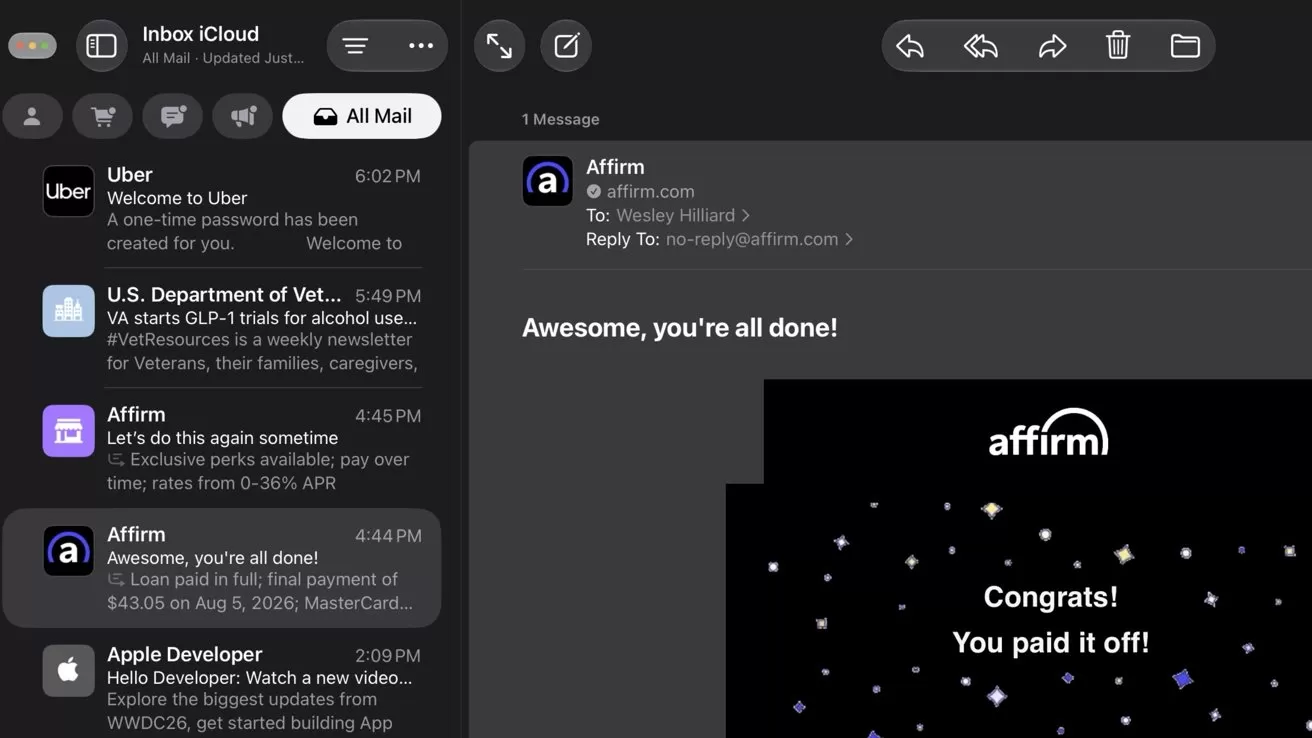
Note the icon used for an account confirmation versus from a mailing list with the separate Affirm emails
So, select the "UBER" name in the "From" section at the top to reveal the email address. It's from "[email protected]" which is not uber.com in any shape or form.
Another clear indicator is the "To" field addressed to over 100 users. I've excluded this from the example image, but it was there in our staff's email.
An alert about an account issue isn't going to be bulk sent to dozens of users at once. That means every user got the same email, same fake ticket number, and apparent account issue.
It also means Uber would be revealing every user's email address to the others. It's just not going to happen.
A little bit of media and internet literacy can go a long way. Spotting scam emails isn't always simple, but fonts, layouts, addresses, and imagery are often easy to spot as an issue when evaluating an email for legitimacy.
It isn't so much that you have to take the time to do this for every email, but that anything claiming to be attached to your finances or account access needs extra scrutiny. As I said earlier, the most fail-safe option is to never open a link sent via email or text unless you're absolutely sure of the sender.
Even then, just go to the website or app manually. It's always worth the extra trouble.