Apple's unexpected August update to the Mac mini and Mac Studio has changed the pricing of the models in a big way. Here's the best desktop Mac you should buy for your budget in fall 2026.
In August, while the world was preparing for the expected launch of new iPhone models in September, Apple had a trick up its sleeve. Without any warning, it launched changes to the Mac mini and Mac Studio near the end of August.
Chiefly, the change was to introduce a new M6 chip generation in the Mac mini, as well as to upgrade the Mac Studio to include M5 Max and M5 Ultra versions. Thanks to the ongoing memory chip crisis, this has also meant changes to the way the models are sold.
This guide will aim to help you decide where you should put your budget if you're in the market for a new desktop Mac in September 2026.
Overall desktop Mac range
Apple has just three models of desktop Mac available to purchase. There's the consumer-friendly Mac mini, the 24-inch iMac, and the performance-focused Mac Studio.
As is typical for Apple, anyone buying its products can choose from a selection of configurations, including the amount of memory and storage is available. In some cases, you can even select your preferred wired network speed.
For the purposes of this article, we are breaking the three product lines into six tiers.
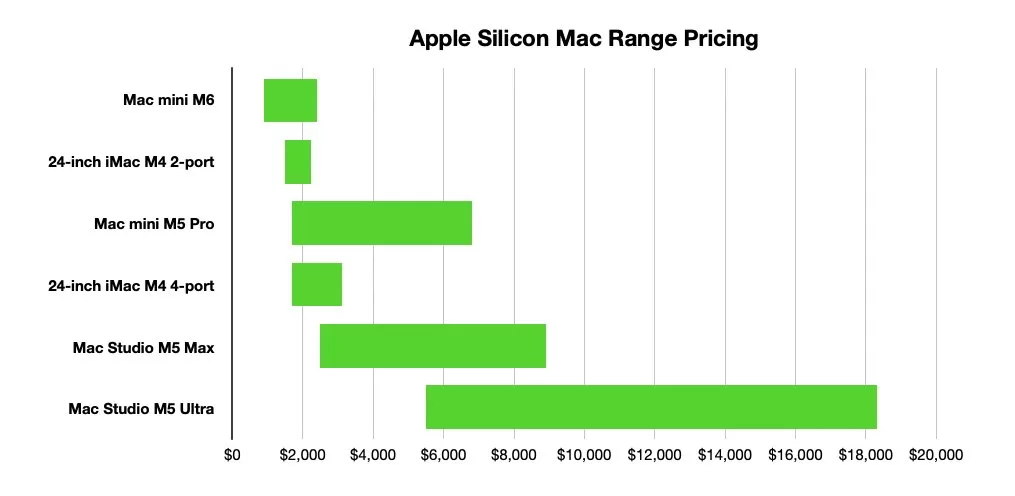
The complete price range of Apple's current Macs, as of September 2026
For the Mac mini and Mac Studio, this is easily handled by pricing based on the chip category, that is M6 or M5 Pro for the Mac mini, M5 Max and M5 Ultra for the Mac Studio.
The 24-inch iMac is also split into two versions, referring to the number of Thunderbolt 4 ports each has. That's because there's also other subtle changes at play that are worth taking into account.
The overall price range for desktop Macs starts at $899 for the cheapest configuration of Mac mini, rising to $18,299 for the current most expensive configuration of Mac Studio. This does not include the Mac Studio's potential 512GB memory configuration, which Apple has yet to publish pricing for.
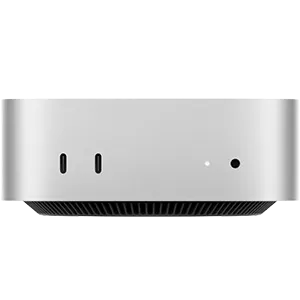
Mac mini (2026)
As usual, we will discuss this in two price ranges: Sub-$2,500 for budget purchases, and $2,500 or more for premium options.
Storage and memory upgrades
There are two big drivers of price changes for Apple's lineup. One is memory, and the other is storage.
With the ongoing memory chip crisis affecting the cost of components across the board, that has meant some changes in price apply. Everything's more expensive, but our advice to you doesn't really change at all.
The first of the two, memory, is a factor that can directly affect the performance of your Mac. Since Apple uses Unified Memory, whatever memory you choose affects the main processing as well as the GPU and AI processing capabilities.
You can get away with using the base amount of memory in your Mac's configuration. However, AppleInsider advises to try and pay for a higher level where possible, especially on the Mac mini.
Be aware that this can get expensive quickly. While going from 16GB to 32GB may only be a $400 price difference on the Mac mini, it's an eye-watering $4,000 to go from 96GB to 256GB on the Mac Studio.
Though Apple hasn't said how much 512GB will cost, it could be double that of the 256GB upgrade.
Also, Apple's structuring of model configurations may mean that you won't get some higher memory options with some chip configurations, but you do on other premium setups. In some cases, you may only get one memory option at all.
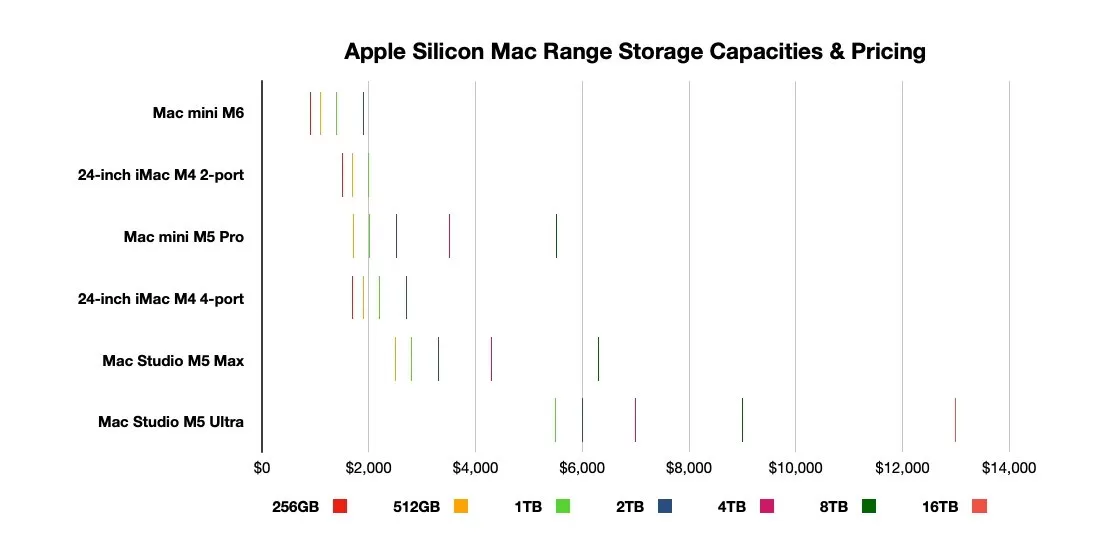
Storage price levels for Apple's desktop Macs, as of September 2026
The other big price changer, storage, is equally as damaging to the wallet. Sure, it's just $200 to go from 256GB to 512GB of storage on a Mac mini, but it soon gets expensive.
Going from 1TB to 16TB of storage on the Mac Studio is a $7,500 jump in cost.
As usual, the AppleInsider recommendation is to be more willing to pay for the memory upgrade over the storage upgrade.
We have preached about the advantages of external storage as a Mac upgrade for some time. Using the fast Thunderbolt speeds and suitable external storage drives, you can get comparable performance.
Apple doesn't make memory or storage user-serviceable in a remotely realistic manner. The typical user is not going to be able to add more to the internal storage or memory after purchase.
At the very least, external storage is an option for consumers. That's why paying for extra memory should be more of a priority over extra storage.
Even if you can afford it, you should still think twice about buying more storage at the more extreme end of the range.
Under $2,500: Mac mini and 24-inch iMac
The battle for your wallet starts, as always, with the Mac mini with M6. The base configuration at $899 includes the 12-core CPU, 12-core GPU, the dual 16-core Neural Engine, 16GB of memory, 256GB of storage, and 2.5Gb Ethernet.
It's the only one to consider for the first couple of steps, with the changes being memory, storage, and a $100 upgrade to 10Gb Ethernet.
The first real choice is at $1,099, where you should choose the memory upgrade to 24GB over the storage upgrade to 512GB, unless capacity is more important to you.
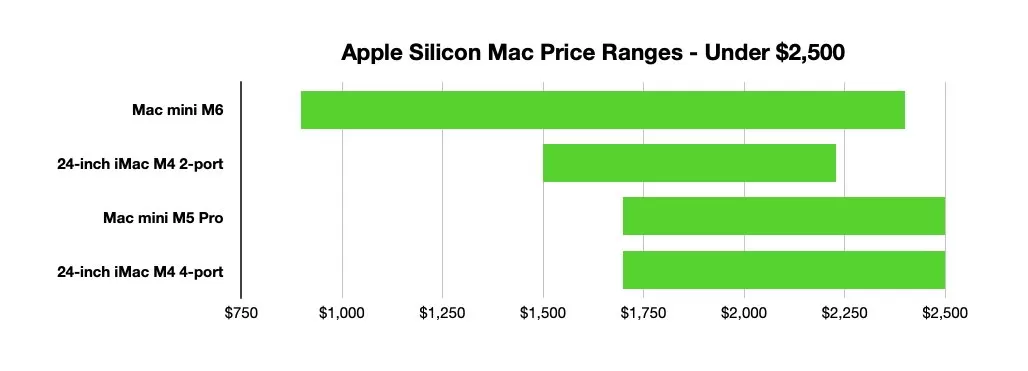
Desktop Mac price ranges below $2,500, as of September 2026
At $1,299, that Mac mini could have both those smaller upgrades, or you could go for 32GB of memory instead. Either's appropriate here.
The first real decision between models comes in at $1,499, as the two-Thunderbolt port version of the iMac enters the conversation. Though really, it shouldn't be a consideration.
In previous years, we would've argued that you could justify getting a better Mac mini and a display for the same money, unless you really care about aesthetics. That's a situation that's even more apparent this time around.
The iMac is still on M4, making it two generations behind. Add in that the two-port iMac doesn't have a Nano-texture glass option, only supports one external display, and that Ethernet is a payable add-on, and it's not a great purchase at all.

M4 iMac
Instead, go for the M6 Mac mini and get both the 32GB of memory and 512GB upgrade, or the base model and spend the difference on a display. Either's a better option than the iMac.
At $1,699, it becomes a four-horse race. For the M6 Mac, you could get the 24GB memory, 1TB storage upgrade, and Ethernet, and you'd be sitting pretty.
However, as well as the lower-tier iMac, there's the upper-tier one as well, with four Thunderbolt ports, a slightly better M4 chip with a few more cores, better external display support, and Gigabit Ethernet as standard.
That all said, it's kinda the same situation again. A Mac mini with a display is always going to be a better shout unless you really want the iMac aesthetics.
The only other real viable option is the M5 Pro Mac mini. It's a chip with more CPU and GPU cores than the M6, and you can pay to go from a 15-CPU, 16-GPU core mix to an 18-CPU, 20-GPU version for just $200 more.
Its base configuration also starts with 24GB of memory and 512GB of storage. 2.5Gb Ethernet is now standard on the Mac mini, but 10Gb Ethernet is only $100 away.
For the rest of this budget range, the Mac mini M6 and M5 Pro are your only serious contenders. You'll generally fare better with the M6 and upgrades for general computing, versus the M5 Pro, which is the performance option here.
That is, until you need more than 32GB of memory, which the M6 Mac mini can go to. At $2,299, you've hit the maximum configuration of 32GB of memory and 2TB of storage for the M6 Mac mini.
For the same money, you can get the 15-core CPU M5 Pro chip, 48GB of memory, and 512GB of storage. It's the better bet, and still is at the top end of this range at $2,499.
At this point, you're going to be looking squarely at the M5 Pro Mac mini with the 18-core CPU upgrade, 512GB of storage, and 48GB of memory. For $100 more, you could keep the lower-tier chip and get 48GB of memory and 1TB of storage.
While the iMac range should not be a consideration, a serious contender becomes an option too.
$2,500 and beyond: M5 Pro Mac mini, Mac Studio
$2,499 is also the price for the lowest-priced Mac Studio. Equipped with the 18-core CPU and 32-core GPU M5 Max, it has 36GB of memory and 512GB of storage.
This is going to be the option to take if you need performance.
If you have another $300 to spend, making it $2,799, the next Mac Studio upgrade is storage to 1TB. The quoted $300 fee to upgrade to the 18-core CPU and 40-core GPU also means paying an extra $300 again for a memory upgrade, so it doesn't apply at this price point.
For the same money, you can get the upper-tier M5 Pro Mac mini with 48GB of memory and 1TB of storage. Or you can pay $100 more for the 64GB memory upgrade and 512GB storage instead.
The Mac Studio seems like the best option again.
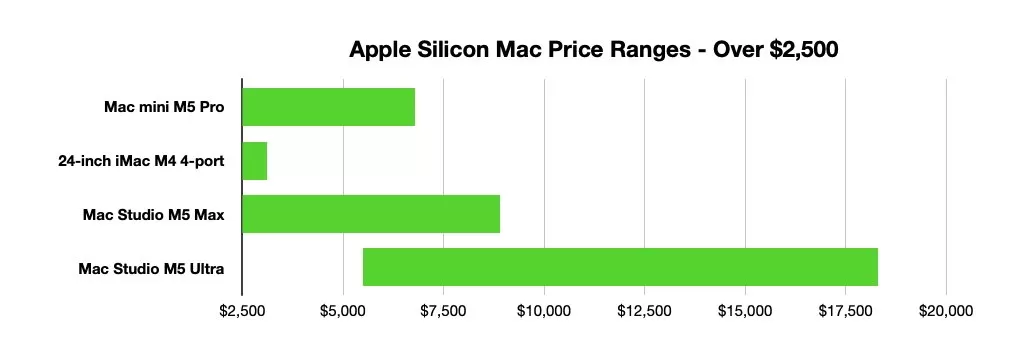
Desktop Mac price ranges from $2,500 up, as of September 2026
At $3,099, you can get the M5 Max Mac Studio with the 40-core GPU option, as well as a 48GB memory upgrade and 512GB of storage. The $3,199 M5 Pro Mac mini can be configured with 64GB of memory instead, as well as more storage, but the far fewer GPU cores work against it here if performance is your thing.
The top configuration of the iMac exists here, with 2TB of storage, Nano-texture glass, the better chip, and 24GB of memory. A 32GB option is theoretically available at $3,299, but that is not currently sold by Apple.
The iMac exits the chat here, outclassed by all of the other options. That is, unless you desperately want an all-in-one Mac color-matched to a room.
We have also reached a point where the decisions become an awful lot easier to determine. Since the budget is so considerable, it becomes more about what you can do performance-wise, so chip performance and memory are priorities over storage.
Beyond this point, the M5 Pro Mac mini specs will lean towards using the best chip and the maximum 64GB of memory, with storage and the Ethernet upgrade being the only real upgrades.
Since you can still vary your chosen chip or memory on the M5 Max Mac Studio, that will be the best option to pick.
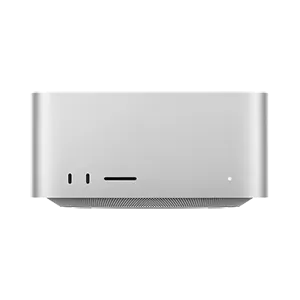
Mac Studio (2026)
At $5,499, the Mac Studio with M5 Ultra becomes a possibility. The base configuration of a 30-core CPU and 64-core GPU is way more than what you can get from the M5 Pro Mac mini, by a considerable margin.
Storage at 1TB for the M5 Ultra is fine, but the base 96GB of memory is a big thing here. The M5 Pro Mac mini's nearest is all but the top spec at $4,799, with only the $2,000 jump from 4TB to 8TB left to go.
For the same $5,499, the M5 Max Mac Studio can be set to use the upper-tier chip that's still not Ultra good, but with 128GB of memory and 1TB of storage. The Ultra model is the best play again.
The Mac mini's last hurrah is at $6,799, with the upper-tier M5 Pro chip, 64GB of memory, and 8TB of storage. The M5 Max Mac Studio is still considerably better with its upper-tier chip, 128GB of memory, and 4TB of storage.
For the same price, the M5 Ultra Mac Studio's upper-tier 36-core CPU and 80-core GPU chip is the option to go for. Sure, it has 96GB of memory and 1TB of storage, but the sheer performance available to you is the draw here.
From here on up, the fight between the M5 Max and M5 Ultra versions of Mac Studio trades massive performance for storage capacity as the prices rise. A lot of that is storage on the M5 Max, which eventually hits its peak at $8,899.
That price level gets you to an M5 Max with an 18-core CPU, 40-core GPU, 128GB of memory, and 8TB of storage. You could instead get the M5 Ultra with the 36-core CPU, 80-core GPU, 96 GB of memory, 4TB of storage, and still save yourself $600.
Unless you really need that extra bit of memory, the M5 Ultra is still the better choice because of that performance.
From here on up, the M5 Ultra Mac Studio is the only choice, until it reaches its inevitable peak at $18,299. That insane price includes the upper-tier chip variant, as well as two key painful upgrades.
The first, and more necessary of the two, is the memory. Going from 96GB to 256GB is a scary $4,000 charge to your bank account.
The second is storage, as the upgrade cost from 8TB to 16GB alone is also $4,000.
Quite frankly, anyone buying for the performance of the M5 Ultra will see the memory upgrade as essential at this price level, but the storage isn't as necessary.
As discussed earlier, storage fees are something that can be mitigated by using external devices. When thousands of dollars are at stake, it's an option potential buyers will be keen to explore.
Where to save up to $500 on Apple's line of desktop Macs
Our comprehensive Mac Price Guide offers easy price comparison across the Mac mini, Mac Studio, and iMac lines. Select the product line of your choosing and find deals and sale prices across hundreds of configurations.
You can also jump straight to the individual Price Guides below for the products referenced in this buyer's guide.
- Best M6 and M5 Pro Mac mini prices
- Best M5 Max and M5 Ultra Mac Studio prices
- Best M4 iMac prices